


Stream your IP camera to YouTube Live – 24/7, unlimited viewers
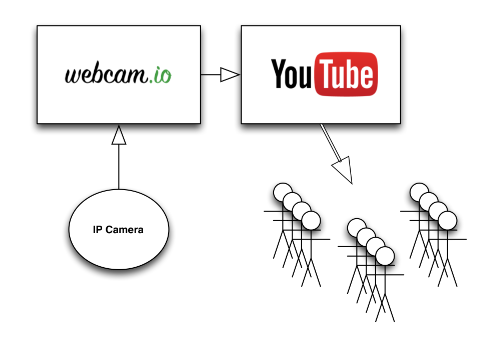
webcam.io connects to your camera, converts the stream if needed and sends it around the clock to YouTube Live, Twitch or Facebook Live.
One connection to your camera, any number of viewers
Your visitors watch in the YouTube player on your website or channel — on any device, in any number — while your camera serves exactly one connection.
How it works
Connect
Find the RTSP or HTTP stream URL of your camera and make it reachable from the internet (port forwarding and dynamic DNS, or a static IP). You can restrict access to our streaming servers only. Camera connection →
Create the stream at the platform
Create a live stream on YouTube, Twitch or Facebook and copy the stream URL and key. On YouTube, a scheduled stream is the right choice for 24/7 operation.
Set up webcam.io
Create a live stream in the dashboard: your camera URL as input, the platform's URL and key as output. Leave transcoding off for H.264 cameras or pick a preset for everything else.
Done
The stream starts within about a minute. webcam.io watches it, reconnects after camera or network errors and shows the status in your dashboard. If something doesn't work, we help with the setup.
Why stream through YouTube, Twitch or Facebook?
What people stream
Supported platforms
Built for 24/7
Supported cameras and stream formats
Any IP camera with an RTSP or HTTP(S) video stream works — Axis, Hikvision, Dahua, Foscam, Mobotix and most others, as well as a Raspberry Pi with camera module.
- RTSP or HTTP(S) input
- H.264 copied unchanged (LIVE plan)
- H.265, MJPEG, MxPEG transcoded (LIVE+ plan)
Embed the live stream on your website
Use the YouTube player with your Channel ID instead of a video ID. The embed then always shows whatever is currently live, even after a restart:
<iframe width="560" height="315"
  src="https://www.youtube.com/embed/live_stream?channel=YOUR_CHANNEL_ID"
  title="Live webcam" frameborder="0"
  allow="autoplay; encrypted-media; picture-in-picture" allowfullscreen></iframe>
Autoplay, muted start, responsive sizing, a script that recovers the player after restarts and instructions for WordPress, Wix and Squarespace: How to embed a YouTube live stream →
Which plan does my camera need?
Which plan you need depends on the video codec your camera puts out:
| Camera output | What we do | Plan |
|---|---|---|
| H.264 (most current IP cameras) | Copy the stream unchanged — lowest latency, lowest load | LIVE |
| H.265 / HEVC | Transcode to H.264 | LIVE+ |
| MJPEG (older cameras) | Transcode to H.264 | LIVE+ |
| MxPEG (Mobotix) | Transcode to H.264 | LIVE+ |
| H.264 with settings the platform rejects | Transcode to a compatible profile | LIVE+ |
Transcoding presets: 720p or 1080p at 5, 15 or 30 frames per second. A 24/7 view rarely needs more than 720p / 15 fps — that keeps bandwidth and cost down.
Technical details
| Input | RTSP or HTTP(S) stream from the camera; H.264, H.265, MJPEG, MxPEG |
|---|---|
| Output | RTMP to YouTube Live, Twitch, Facebook Live, Vimeo or any RTMP server |
| Transcoding | 720p / 1080p at 5, 15 or 30 fps (LIVE+); copy mode for H.264 (LIVE) |
| Camera bandwidth | from 1 Mbit/s upload; 2 Mbit/s or more recommended for 1080p |
| Connections to the camera | one, regardless of viewer count |
| Reliability | automatic reconnect and restart, backup stream, status in the dashboard |
| Access control | restrict your camera's firewall to our published streaming server IPs |
| Infrastructure | servers in Frankfurt, Germany, 100 % green electricity; operated from Hamburg since 2012 |
Frequently asked questions
Do I need a YouTube account?
Yes — a free YouTube account with live streaming enabled, or a Twitch or Facebook account. The stream runs on your channel, under your name; webcam.io only feeds it.
Does my camera have to be reachable from the internet?
Yes. For live streaming we pull the video from your camera, so it needs port forwarding and dynamic DNS or a static IP. You can limit access to our streaming server addresses in your router or camera firewall. (Time-lapse is different: there the camera pushes images via FTP and nothing has to reach it.)
My camera only outputs MJPEG or H.265. Does that work?
Yes. YouTube and Twitch accept H.264 only; the LIVE+ plan transcodes MJPEG, H.265 and Mobotix MxPEG on the fly. Cameras from around 2010 work as well as current ones.
How much bandwidth does the camera need?
About 1 Mbit/s upload for a stable 720p stream, 2 Mbit/s or more for 1080p. Only one connection is made to your camera, so the number of viewers doesn't matter.
How many people can watch?
As many as YouTube, Twitch or Facebook can serve — effectively unlimited. Your camera and connection are not involved in delivery.
How much delay does the stream have?
Roughly 15–30 seconds with YouTube's normal latency setting, 3–5 seconds with ultra-low latency. Normal latency is the most stable choice for a 24/7 camera.
Can I use a USB webcam?
No. webcam.io needs a network camera with an RTSP or HTTP stream. For a USB camera, streaming software on a PC such as OBS is the right tool.
Is live streaming included in the free plan?
Live streaming needs the LIVE or LIVE+ plan. The 7-day trial includes LIVE+ with transcoding, so you can test your camera before you decide. Compare plans →
Live stream or time-lapse?
A live stream shows the moment; a time-lapse shows the day. If your connection is slow or metered, or you want a video and an archive of every day, start with a time-lapse — it works with one image every few seconds.
If visitors should see what is happening right now, stream. Many customers run both from one camera: a live stream entry and a time-lapse entry in the same account.
Try it for your camera or contact us
Test all features during the 7-day LIVE+ plan trial. After that, you are moved to our free plan automatically. No credit card required.
